

Summary
Virtual assistants working in legal, real estate, finance, and other niche industries are regularly expected to fax on behalf of their clients. Signed contracts, intake forms, business forms, and NDAs often need to go by fax, and not being able to deliver creates a gap that undermines your value. FaxBurner gives VAs a virtual fax number, email-to-fax capability, and cloud storage for every document sent and received, with no hardware or phone line required.
| Time to Read | ~7 minutes |
|---|---|
| What You’ll Learn |
|
| Next Steps |
|
Virtual assistants work across industries, manage multiple clients, and handle a wide range of administrative tasks remotely. And depending on who those clients are, faxing is part of the territory.
Clients in legal, real estate, finance, and accounting spaces still rely on fax to send formal documents to their intended recipients. Signed contracts, referral forms, business forms, and NDAs often need to be sent by fax, either because the receiving party requires it, the industry expects it, or compliance demands it. If you’re a VA and don’t offer faxing, it can create a gap your clients will need to fill somewhere else.
The good news is that faxing as a VA has never been easier. You don’t need a fax machine, a phone line, or any dedicated hardware. All you need is an online fax service that works reliably wherever you are.
Why Faxing Still Matters for Virtual Assistants
It’s easy to assume faxing is a legacy concern, but in practice, it isn’t, especially not for VAs working with clients in regulated or document-heavy industries.
The reality is that many of the most lucrative VA niches require faxing as a standard part of the job. Legal assistants fax court documents and signed agreements. Real estate VAs fax purchase offers and disclosure documents. Finance and accounting VAs send forms to business partners that haven’t moved away from fax. In all of these cases, the client’s clients or counterparties expect fax, and an inability to deliver it creates friction that undermines your value as a VA.
Fax also offers a practical advantage when sending formal documents because it provides clear delivery confirmation. Email read receipts aren’t always reliable or even enabled, but a fax confirmation shows that the document went through, and every sent fax receives that confirmation. For time-sensitive or legally important paperwork, that added certainty can make a real difference.
Which Virtual Assistant Tasks Involve Faxing?
The answer depends on the industries you serve, but here’s a practical overview of where faxing comes up most often:
| Task | Industries | Why Fax Is Required or Preferred |
|---|---|---|
| Submitting signed contracts | Legal, real estate, finance | Delivery confirmation; legally recognized in many jurisdictions |
| Filing forms with business partners | Accounting, HR, compliance | Many companies still prefer fax for submissions |
| Sending NDAs and agreements | Any industry | Point-to-point delivery reduces exposure vs. email routing |
| Client intake and onboarding forms | Legal, financial | Physical or signed copies expected by clients |
| Vendor and supplier communications | Procurement, operations | Some vendors only accept purchase orders by fax |
If you’re building a VA practice around any of these industries, faxing capability isn’t a nice-to-have. It’s a baseline expectation.
How to Fax as a Virtual Assistant Without a Fax Machine

Traditional fax machines are impractical for remote work. They require a dedicated phone line, take up physical space, need paper and toner, and can only be used from one location. None of that fits the VA model.
Online fax services are the obvious solution. They give you a virtual fax number and let you send and receive faxes from anywhere on any internet-connected device, including your laptop, your phone, your tablet, or your email client, without the need for hardware or a dedicated phone line.
FaxBurner is built for exactly this use case. Here’s what it gives you as a VA:
- A virtual fax number that clients can send documents to
- Send faxes by email. Compose an email to [email protected] with the recipient’s fax number in the subject line and your document as a PDF attachment
- Receive faxes as PDFs delivered straight to your inbox
- Mobile app for iPhone so you can fax from anywhere
- Cloud storage for all sent and received faxes, searchable and accessible from any device
- Delivery confirmation on every fax sent, so there’s no need to call and verify
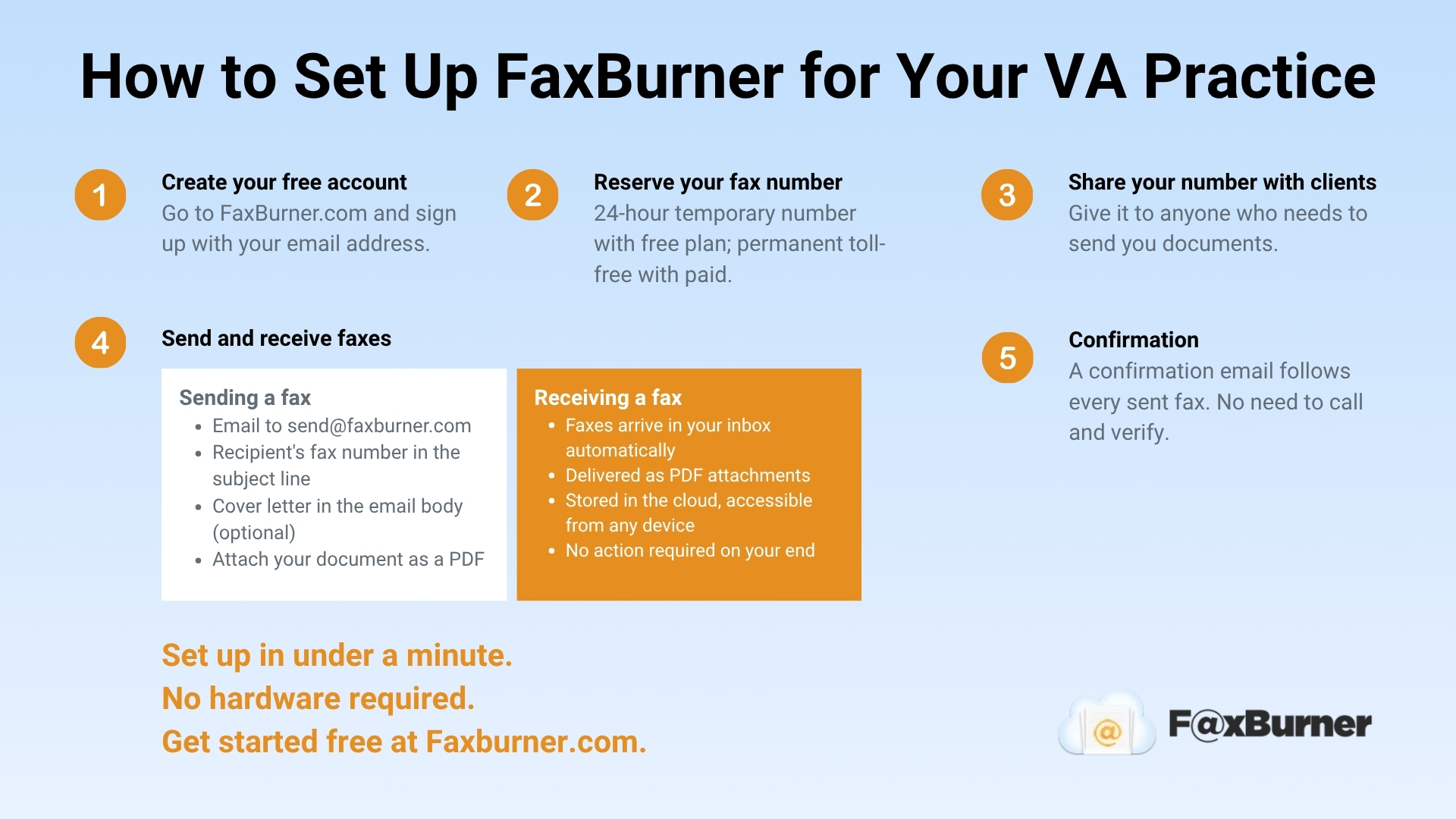
How to Set Up FaxBurner for Your VA Practice
Getting set up takes under a minute:
- Go to FaxBurner.com and create a free account using your email address.
- Reserve your fax number. Free accounts receive a temporary number valid for 24 hours. Professional and Premier accounts receive a permanent toll-free number.
- Share your fax number with clients who need to send you documents.
- To send a fax, compose an email to [email protected]. Put the recipient’s fax number in the subject line, add any cover letter text in the body, and attach your document as a PDF.
- Incoming faxes arrive in your inbox as PDF attachments, with a confirmation email for each one.
Managing Fax for Multiple Clients
One of the practical challenges for VAs is cleanly managing communications across multiple clients. FaxBurner handles this in a few ways:
Use one number per client if needed
If you’re managing faxes on behalf of a client rather than as yourself, you can set up a separate FaxBurner account using the client’s email address, giving them their own permanent fax number. Incoming faxes go straight to their inbox, and you can send from that account on their behalf.
Or use your own number as the central point
For VAs who handle fax as a service they own, our paid accounts give you a permanent number with up to 2,000 inbound and outbound pages per month. All faxes are stored in the cloud, organized by date and sender, and accessible from any device. You can forward specific faxes to clients as PDFs directly from your email.
Fax from wherever you’re working
Because FaxBurner runs through your browser or email, you’re not tied to a specific device or location. Whether you’re at home, your desk, traveling, or working from a client’s office, you can send and receive faxes from anywhere.
Which FaxBurner Plan Is Right for Your VA Practice?
| Plan | Cost | Pages/Month | Best For |
|---|---|---|---|
| Free | $0 | 25 inbound per month / 5 outbound lifetime total | Testing the service or very occasional faxing |
| Professional | $14.95/mo | 500 inbound and outbound | VAs with moderate volume and multiple clients |
| Premier | $24.95/mo | 2,000 inbound and outbound | VAs with regular faxing needs or multiple clients |
For many VAs doing regular work in fax-heavy industries, the Premier plan is the practical choice. The free plan is useful for testing the service or for occasional one-off faxes where a temporary number is fine.
How to Position Faxing as Part of Your VA Services
Many virtual assistants overlook faxing, which is a huge missed opportunity to set themselves apart.
Clients in legal, real estate, and finance actively seek VAs who can handle end-to-end document workflows, including faxing. If your service listing or onboarding materials mention fax capability, you’re signaling to those clients that you understand their industry and won’t create gaps in their document processes.
Practically, this means:
- Including fax in your service description alongside email management, scheduling, and document handling
- Asking new clients upfront whether they have any fax requirements, so you’re prepared before it comes up
- Letting clients know your fax number as part of your standard onboarding so that they can route documents to you from day one
- Building fax confirmation into your workflow: forwarding the confirmation email to the client as part of your document delivery process adds a professional touch that email alone can’t replicate
The Bottom Line
Faxing isn’t going away for VAs working in regulated or document-heavy industries. The clients who need it most (legal, finance, real estate) tend to expect it as a baseline capability, and offering it from the get-go automatically sets you apart from VAs who can’t provide it.
FaxBurner removes every barrier that has made faxing impractical for remote workers. No machine, no phone line, and no location dependency. Just a fax number, an email client, and the ability to send and receive documents reliably from wherever you’re working.
