

| Time to Read | ~8 minutes |
|---|---|
| What You’ll Learn |
|
| Next Steps |
|
As businesses move away from traditional faxing, Fax over Internet Protocol (FoIP) has become the practical solution for modern document transmission. By using the internet instead of analog phone lines, FoIP lets businesses send and receive faxes without hardware while integrating with existing digital workflows.
FoIP is often confused with VoIP, and knowing the difference matters, especially if you’re trying to fax over a VoIP system and wondering why it keeps failing. This guide covers what FoIP is, how it differs from VoIP, the three available transmission methods, and when each is the right fit.
What Is Fax Over IP (FoIP)?
Fax Over Internet Protocol (FoIP) is a technology that allows you to send and receive faxes using the Internet rather than traditional phone lines. Instead of relying on a fax machine connected to a landline, FoIP transmits fax data over an IP (Internet Protocol) network. This makes faxing faster, more flexible, and more compatible with modern business workflows.
Sometimes people confuse FoIP and VoIP, as both rely on internet-based networks to transmit data. However, they serve different purposes. VoIP (Voice Over IP) is designed for making voice calls over the internet, replacing traditional phone systems. In contrast, FoIP is designed specifically for sending and receiving fax documents over the Internet.
Both FoIP and VoIP represent a shift from traditional faxing, which relies on analog phone lines, dedicated fax machines, and physical supplies like paper and ink. Traditional faxing requires more resources and infrastructure, making it less efficient for modern businesses.
Traditional Faxing vs. FoIP vs. VoIP: A Complete Overview
| Feature | Traditional Faxing | FoIP (Fax Over IP) | VoIP (Voice Over IP) |
|---|---|---|---|
| Purpose | Sending and receiving documents over analog phone lines. | Sending and receiving fax documents over the Internet. | Making and receiving voice calls over the Internet. |
| Primary Use | Document transmission using fax machines and phone lines. | Document transmission over an IP network. | Replacing traditional phone systems with Internet-based calling. |
| Technology Focus | Document transmission using fax machines and phone lines. | Designed for transmitting fax data digitally. | Designed for transmitting voice data digitally. |
| Equipment Needed | Fax machine, landline, paper, and ink. | Internet connection, fax software, or an online fax service. | Internet connection, VoIP phone, or software (e.g., apps). |
| Integration | Limited integration with digital workflows. | Often integrates with email and document management systems. | Often integrates with customer communication tools like CRMs. |
| Common Applications | Businesses using traditional communication methods. | Businesses that require faxing but want a more modern solution. | Businesses looking for cost-effective and flexible communication options. |
Can Faxes Be Sent Over VoIP?
The short answer is yes, a fax can technically be sent over VoIP, but it’s not especially reliable, and not advisable if you need to be confident that your fax will be delivered.
Here’s why. Traditional fax machines were designed to use analog networks and the T.30 protocol, which transmits fax data as a continuous analog signal. VoIP works differently. It digitizes audio into data packets, transmits them over the internet, and then reassembles them at the receiving end.
Fax data is more sensitive to packet delays and loss than voice data. When voice packets arrive late or out of order, the audio sounds slightly choppy, but is still basically intact. When fax packets are delayed or lost, the receiving machine can’t reassemble the document correctly, and the fax fails to send. The older a fax machine is, the more likely it is to use the T.30 protocol and struggle with VoIP transmission.
Newer fax machines use the T.38 protocol, which is specifically designed to fax data over IP networks. A T.38-capable machine can more reliably receive faxes sent over VoIP, but since you often can’t know whether the recipient’s machine supports T.38, relying on VoIP for faxing introduces an uncertainty that purpose-built FoIP systems avoid entirely.
How Does Fax Over IP Work?
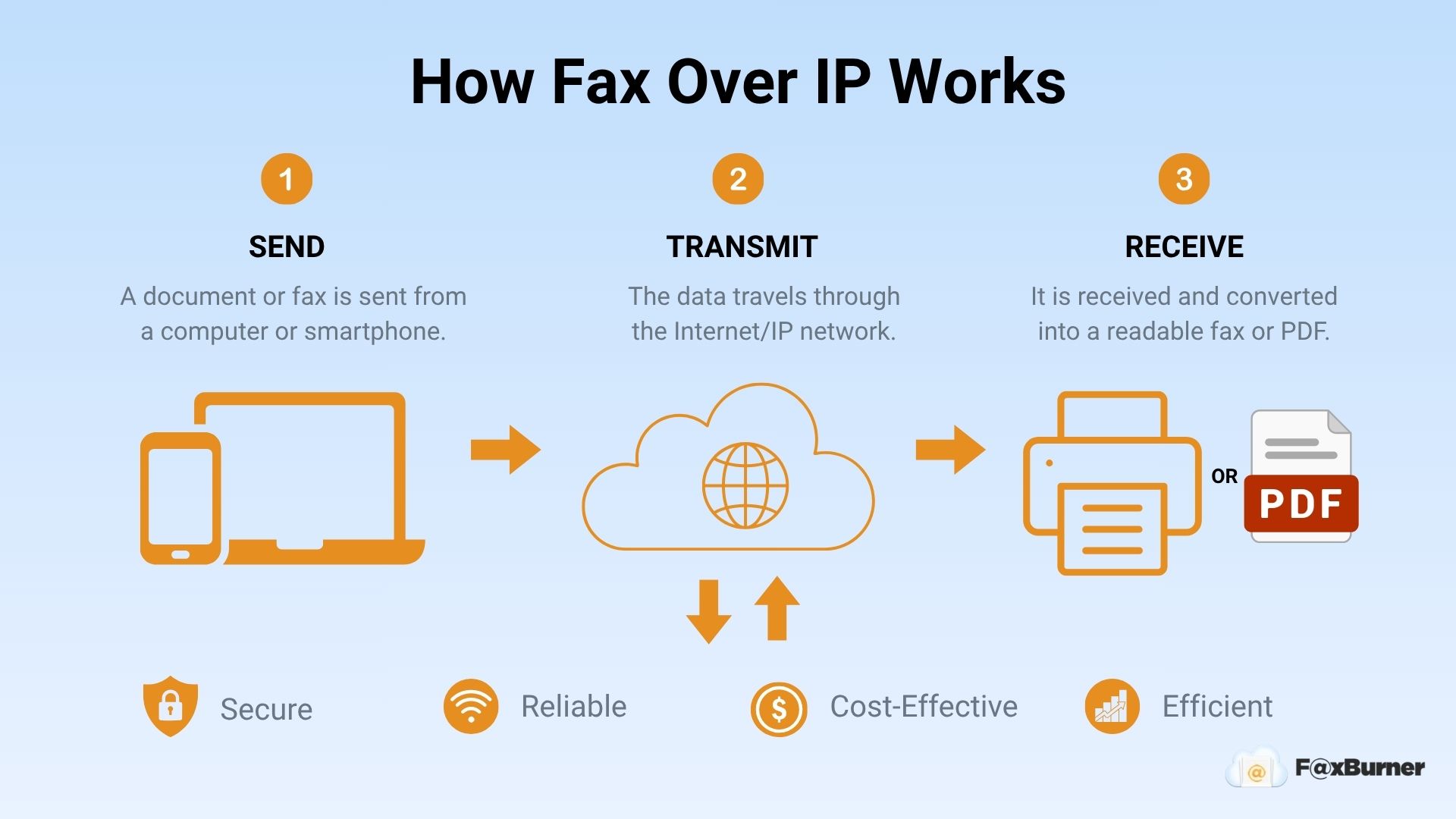
Fax Over IP (FoIP) uses the internet to transmit fax data instead of traditional phone lines. It converts fax documents into digital packets and sends them over an IP (Internet Protocol) network. When a fax is sent, the FoIP system translates the document into data that can travel through the Internet. On the receiving end, this data is reassembled into a readable fax format.
FoIP systems often integrate with existing tools such as email, online fax services, and document management platforms. Businesses can send and receive faxes directly from their computers, smartphones, or tablets without needing physical fax machines. This eliminates the need for dedicated phone lines, reducing both infrastructure and costs.
FoIP Transmission Methods
There are three primary methods for transmitting faxes over IP networks:
Store-and-Forward
The store-and-forward method temporarily stores fax data on an intermediate server before sending it to the recipient. This method is asynchronous, meaning it doesn’t require both parties to be connected at the same time. It’s a flexible option for businesses that don’t need immediate delivery but prioritize consistent and successful transmissions.
While this approach reduces the impact of network issues, it may lead to delivery delays. It’s particularly useful for businesses working across different time zones or those dealing with less reliable networks.
Pros:
- Reliable for transmitting faxes even when network conditions fluctuate.
- Useful for asynchronous communication and cross-time-zone operations.
Cons:
- Delivery times may be longer compared to real-time methods.
- Requires additional storage infrastructure, adding some complexity to the implementation.
Fax Passthrough
The passthrough method uses the G.711 codec to convert fax signals into audio packets that are transmitted over an IP network. This method sends faxes in real-time, making it straightforward and easy to implement. Businesses with stable, high-quality network connections often use this approach because it allows immediate fax transmission without delays.
However, G.711 was developed for voice data rather than faxing, which can create issues when network conditions fluctuate. Problems like packet loss or interruptions may result in incomplete transmissions, making it less reliable for businesses with inconsistent networks.
Pros:
- Simple setup with minimal configuration.
- Transmits faxes instantly when the network is stable.
Cons:
- Not designed specifically for fax data, making it vulnerable to network disruptions.
- Requires consistent and stable network conditions to avoid failures.
Fax Relay
The relay method uses the T.38 protocol, which is specifically designed for sending fax data over IP networks. Unlike the pass-through method, T.38 converts fax data into smaller digital packets, making it more effective at handling issues such as delays or data loss during transmission. This method delivers fax documents more reliably, even in networks with fluctuating conditions.
Relay is a good choice for businesses that need dependable fax communication. However, it requires compatible systems and equipment, which can make setup more complex compared to passthrough. Businesses with moderate to high faxing needs often find this method practical for keeping operations smooth.
Pros:
- Designed specifically for fax communication to reduce the risk of transmission errors.
- Performs well in networks with varying conditions.
Cons:
- Requires compatible equipment and software, adding complexity to the setup.
- May involve a higher initial configuration effort than the pass-through method.
What About PSTN? How FaxBurner Handles Fax Transmission
FaxBurner doesn’t rely on VoIP. Instead, it uses PSTN (Public Switched Telephone Network) lines, which comprise the aggregate of the world’s circuit-switched telephone networks operated by national, regional, and local telephony operators.
PSTN lines conform to how fax data is intended to be transmitted. The network encompasses telephone, fiber optic, cellular, satellite, and undersea connections, and because fax transmission was originally designed around PSTN infrastructure, compatibility and reliability are built in. That’s why more than 99% of faxes sent through FaxBurner are delivered successfully.
In practice, this means FaxBurner combines the convenience of internet faxing (send from any device, receive as a PDF in your inbox, cloud storage for every fax) with the reliability of PSTN transmission. You get the best of both without the failure rate that comes with faxing over standard VoIP.
Benefits of Using FoIP
Whether you’re using a dedicated FoIP service or an online fax platform like FaxBurner, the advantages over traditional faxing are obvious:
- Cost Savings: You save on the costs of fax machines, dedicated phone lines, paper, and ink. FoIP removes the need for maintenance or repairs, freeing up your budget for other priorities.
- Workflow Integration: FoIP integrates with tools you already use, such as email, cloud storage, and document management systems.
- Scalability: FoIP adjusts to your needs. It handles both small and large volumes of faxes without requiring extra machines or lines, making it simple to expand as your needs change.
- Remote Access: You are no longer tied to a specific location. FoIP allows you to send or receive faxes from anywhere with an internet connection, enabling remote work and mobility.
- Simplified Document Management: FoIP converts your faxes into digital copies that are easy to store, organize, and retrieve. Integration with cloud-based systems provides fast access to important documents when you need them.
- Reduced Downtime: Traditional fax machines often cause delays from paper jams, mechanical failures, or phone line issues. FoIP uses digital networks to avoid these problems, keeping the process reliable and uninterrupted.
Choosing the Right FoIP Provider
Picking the right Fax Over IP (FoIP) provider can save you time and make faxing easier. The best provider should match your needs and offer services that fit into how you work. At FaxBurner, you can send and receive faxes with ease using a smartphone, tablet, or computer, providing a practical option for modern communication.
Here are the key factors to consider when choosing a FoIP provider:
- Ease of Use: An intuitive interface that doesn’t require technical setup. A simple setup saves time and avoids unnecessary complications.
- Device Compatibility: Works across phones, tablets, and computers. This flexibility ensures you can send and access faxes wherever you are.
- Pricing Options: A good provider offers affordable options without locking you into unnecessary features or high costs.
- Reliability: Choose a service that consistently handles fax transmissions, even during peak periods. Downtime or failed faxes can disrupt your workflow.
- Customer Support: Reliable support can help you troubleshoot issues quickly. You’ll want accessible customer service when problems arise.
When implementing FoIP, a few practical steps can make the transition smoother: assess your actual fax volume before choosing a plan, run test faxes before fully switching, and integrate the service with tools your team already uses, like email or cloud storage, to avoid managing a separate system.
The Bottom Line
FoIP and VoIP aren’t interchangeable, and treating them as such is one of the most common reasons businesses experience fax failures. VoIP is built for voice; fax data has different transmission requirements that VoIP wasn’t designed to handle reliably.
FoIP, particularly using the T.38 protocol or a PSTN-based online fax service, removes those reliability issues while preserving all the flexibility of internet-based faxing. For most businesses, the simplest path to reliable faxing without hardware is an online fax service that handles the technical infrastructure for you.
If you’re looking to make faxing easier and simpler, download the FaxBurner app or start a free trial on our website. We’re here to help you transition seamlessly to a more efficient faxing solution.
