

Summary
Faxing isn’t instant, but it’s faster than most people think. A single page from a modern machine takes about a minute, while older machines can stretch that to six. The slowest device in the exchange always sets the pace, and document type matters too: text transmits faster than images. Online faxing removes most of these limitations, with documents arriving in seconds and no hardware to maintain. Small adjustments like lowering resolution or compressing files can also make a noticeable difference.
| Time to Read | ~7 minutes |
| What You’ll Learn |
|
| Next Steps |
|
If you’ve ever wondered, “How long does it take to fax a document?”, this article is for you. Faxing, even though not as widespread as a few decades ago, is still a trusty way of sending or receiving important documents quickly. It’s no wonder that the query about the time it takes to fax is a common one. But the response isn’t cut-and-dried;, in fact, various factors can affect how quickly a fax is transmitted. So sit back as we delve into these factors and provide some general guidelines on how long you can expect the faxing process to take.
Our discussions wouldn’t be complete without mentioning online faxing service options. Meet FaxBurner, a company that provides efficient and reliable fax solutions. You can completely transform the way you fax by utilizing our fantastic free fax app for iPhone or choosing the versatile free email-to-fax service for computer and phone. We aim to redefine faxing for the digital age, making it quicker and more convenient than ever before.
What Influences the Speed of Faxing
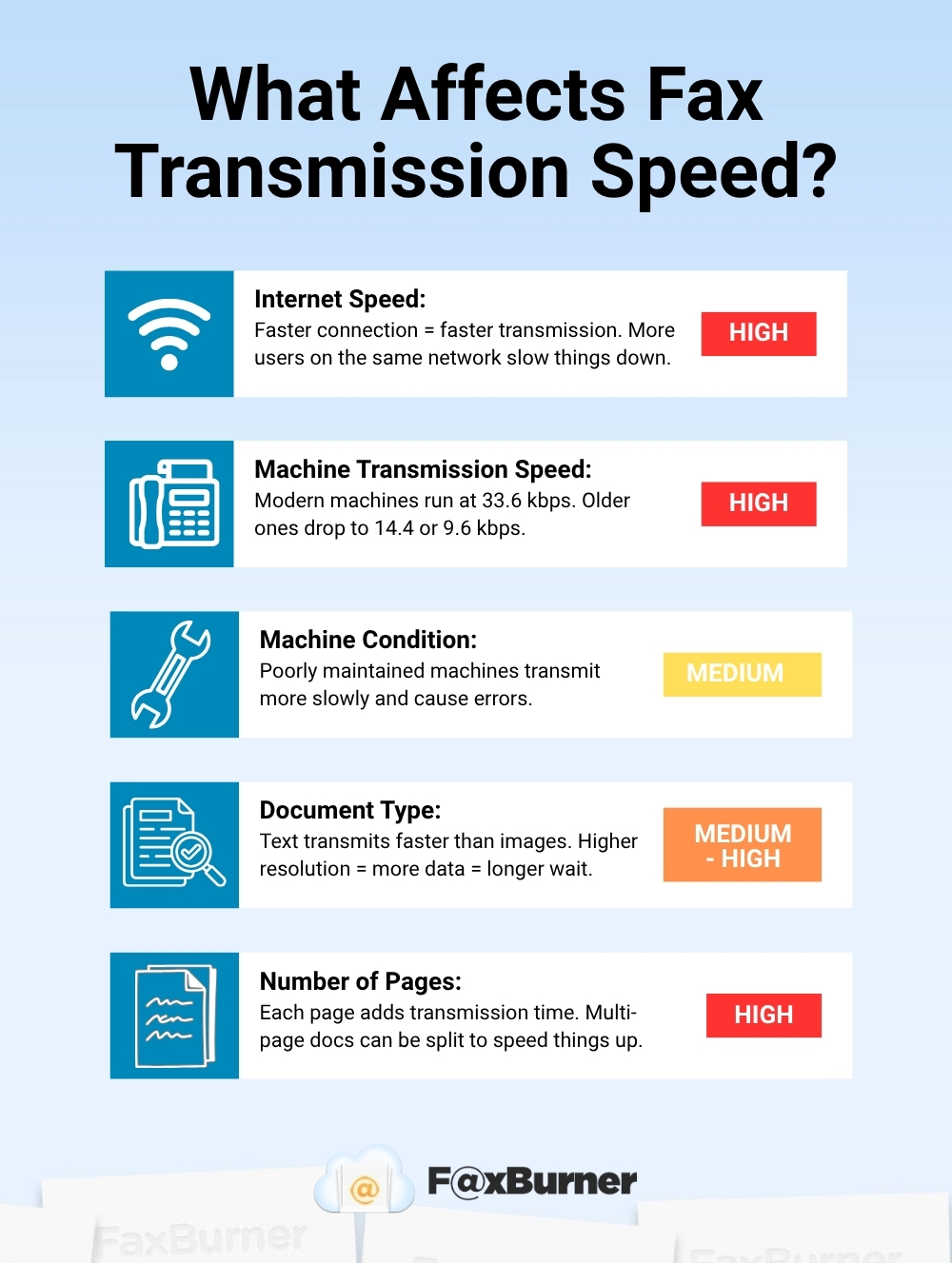
The speed of faxing can be influenced by several factors, and it’s essential to consider them before sending a document. The main ones are the speed of the internet connection, the condition and transmission speed of your fax machine, and the type of document you’re faxing.
Let’s take a closer look at each of these factors.
Internet Speed
If you’re choosing to send your faxes online, then one thing that significantly will impact the speed of your faxing is your internet connection and its speed.
When faxing a document, the information is first converted into digital data and then transmitted over the internet to the recipient’s fax machine, phone, or computer. The internet speed determines how quickly this process can occur.
If the internet speed is slow, then the transmission of the fax will be affected as well, as the data will take longer to travel from the sender’s computer to the recipient’s fax machine or computer.
The internet connection’s speed can be affected by several factors, including the quality of the connection, the distance between the sender and the recipient, and the number of people using the internet connection at the same time.
In general, a faster internet connection will result in faster fax transmission times. It is recommended to use a reliable and high-speed internet connection when sending faxes, as this will help ensure that the transmission is quick and efficient.
Fax Machine’s Transmission Speed
The transmission speed of the fax machine is another significant factor that will impact the time needed to send a fax.
The transmission speed is the rate at which the fax machine can send and receive data, and it is typically measured in bits per second (bps). If the fax machine has a low transmission speed (for example, 5,000 bps), then it will take longer to send and receive documents, resulting in slower fax transmission times.
The transmission speed of a fax machine can vary depending on the model and age of the machine. Most modern fax machines use a standard 33.6 kbps connection speed, but older machines may operate at lower speeds, such as 14.4 kbps or 9.6 kbps. To minimize transmission time, ensure your fax machine is operating at the highest possible speed supported by your telephone line.
Condition of a Fax Machine
A well-maintained and functioning fax machine will generally be able to transmit data faster and more efficiently than one that is not in good condition. Regular maintenance is required to keep a fax machine in optimal condition, and this can include cleaning the machine, replacing worn-out parts, and updating software.
Failure to maintain the fax machine properly can result in slower transmission speeds, as well as other issues such as paper jams and poor-quality faxes. This can cost companies a lot of money and time in the long run, and for this reason, many businesses choose to send their faxes online via faxing apps like FaxBurner.
Faxing online is very convenient and cost-effective. You don’t have to worry about spending money on fax machine check-ups because all you need to send your documents is a phone, a computer, and an internet connection. Easy, fast, and reliable.
The Type of Document Being Transmitted
The type of document being transmitted can also influence the speed of fax transmission. In general, text documents are faster to transmit than image-based documents, such as photographs or graphics.
Similarly, image-based documents with higher resolutions or more complex graphics can take longer to transmit than those with lower resolutions or simpler graphics. In some cases, it may be necessary to adjust the resolution or compress the image to reduce its size and speed up the transmission.
Number of Pages
The number of pages in a document will affect the time it takes to receive a fax. More pages mean more data to be transmitted, resulting in a longer wait for the receiving party. If you need to send a multi-page document, it’s helpful to break it up into smaller sections and send them separately, if possible, to reduce the overall transmission time.
How Long Does Faxing Take Using a Fax Machine
Overall, the time it takes to fax a document using a fax machine can range from a few minutes to several minutes. In most cases, it takes anywhere from 1 minute to 5 minutes to send a fax. If you want to ensure your fax went through, wait for a fax confirmation.
It’s worth noting that the machine determining how quickly the data flow can be is the slower one of the pair. So even if you have a fast, modern machine, if the recipient’s machine is older, the exchange will only be as fast as the slowest device.
How Long Does It Take to Receive a Fax Using Online Faxing
In general, online faxing is considered to be faster than traditional faxing methods as there is no need to physically print and scan the document. Once the document is uploaded to the online fax service, it can be transmitted almost immediately.
Just as we mentioned before, the speed of transmission depends on the speed of the internet. If the internet connection is slow, it can take longer to upload and transmit the document.
In most cases, online faxing can take anywhere from a few seconds to a few minutes to transmit a document. Online fax services can also provide features such as receipt and delivery confirmation, making it easier to track the progress of the fax transmission.
💡 A standard-resolution, one-page fax typically takes around one minute to transmit using a traditional machine at 33.6 kbps. With online faxing, that same document can arrive in seconds.
What To Do To Speed Up Faxing
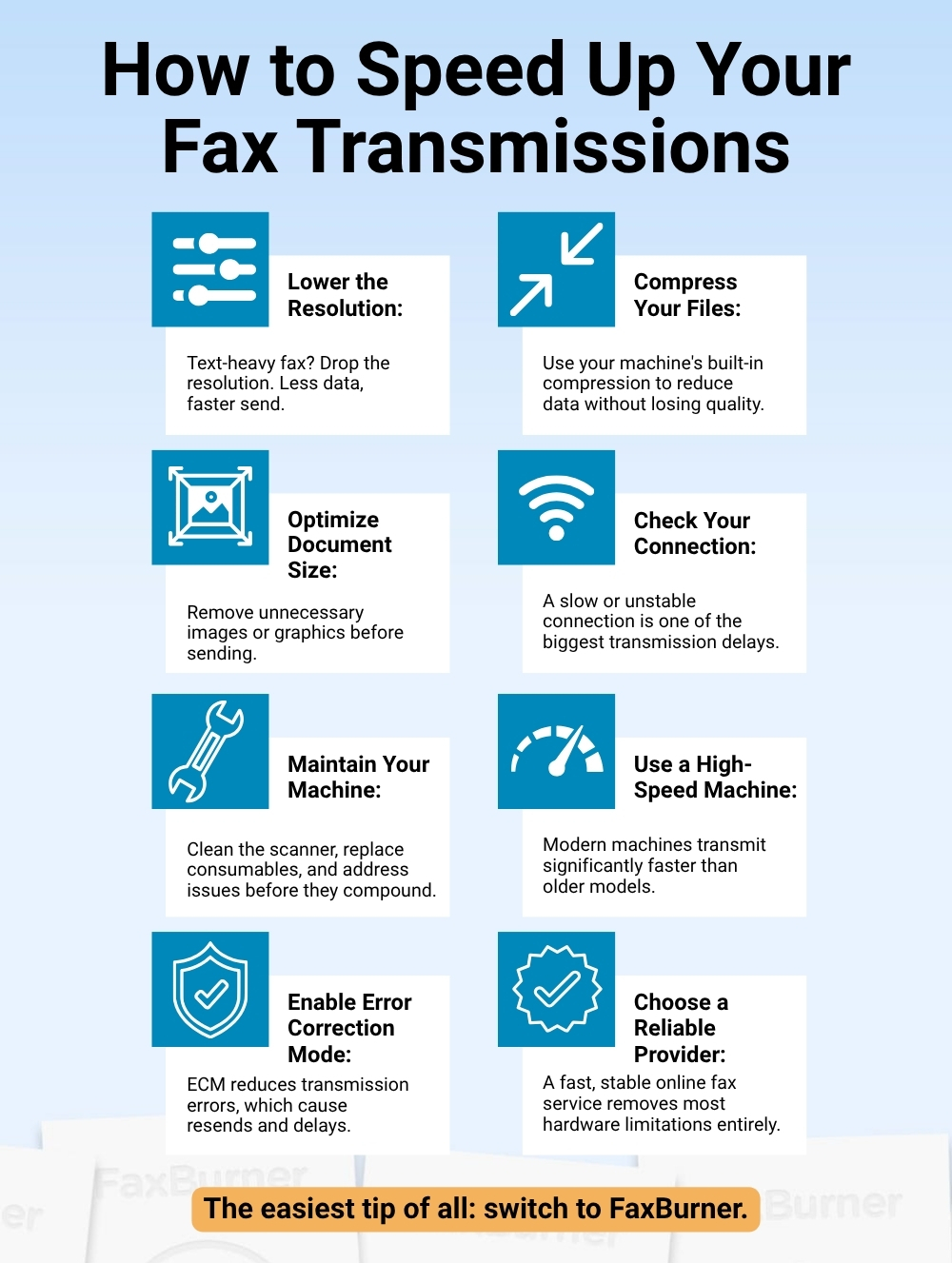
What are the best practices for ensuring higher fax transmission speeds? Here’s what works:
- Ensure that the fax machine is in good condition: Regular maintenance and cleaning of the fax machine can help improve its efficiency and speed up the transmission process.
- Optimize the document size: Large and complex documents can take longer to transmit. Resizing the document or reducing its resolution can help speed up the transmission process.
- Check the internet connection: If using online faxing, a slow internet connection can significantly slow down the transmission process. Ensure that the internet connection is fast and stable.
- Use a high-speed fax machine: High-speed fax machines are designed to transmit documents more quickly and efficiently than standard fax machines.
- Choose a reliable fax service provider: If using online faxing, choose a reputable and reliable fax service provider with a fast and efficient transmission system.
- Use error correction mode: Error correction mode (ECM) is a feature available on most fax machines that can help reduce errors during transmission and speed up the process.
- Choose the appropriate resolution: While high-resolution faxes may offer better image quality, they also take longer to transmit. If the content of your fax is primarily text-based or fine details aren’t crucial, consider using a lower resolution setting.
- Use compression techniques: Some fax machines offer built-in data compression features, which can help reduce the amount of data that needs to be transmitted without sacrificing image quality. Consult your fax machine’s user manual to see if this option is available.
By following these tips, you can significantly speed up the faxing process and improve its efficiency.
Are Fax Machines Instant? Online Fax vs. Traditional Fax
Is a fax machine instant? The short answer is no, but it is fast, especially when faxing online. The speed depends on the type of machine being used, and both ends of the exchange matter.
Internet-based fax services sidestep this limitation entirely. Using either photos from your phone or by attaching a document, you can have a fax sent extremely quickly. Faxes are stored in the cloud and delivered as PDFs, with no printing or scanning required on either end.
When physical documents need to be transmitted or a signature is needed, faxing is likely faster than other methods which require printing and scanning. And with online faxing, those advantages come without the hardware.
Get Faxing Faster With FaxBurner
The time it takes to fax something depends on your equipment, your document, and your connection, but the simplest way to speed everything up is to switch to online faxing. No machines to maintain, no phone lines to manage, and no waiting around for a confirmation printout.
With FaxBurner, you get a free fax number in 30 seconds and can send and receive faxes instantly from your phone, email, or browser, from anywhere.
